


 Group sessionsFrom $40 · 1 h 45 min, coached
 1-on-1 coachingYour pace, one coach
 Corporate eventsFrom $390 + GST
 Gift vouchersEmailed instantly · valid 3 years
 RTW PodcastFine dining menu of sports
 .blank tees$40 · 3 for $100

 Latin heritage teesMade for Sydney's Latin festivals
 Get Shit Done ClubFor doers
 Team & bulk tees10+ from $26 each
 SoL glass cupsFinal stock
 Spotter Mat ProFor gym owners and serious home gyms
 Flip-digit price tagsFor retail counters and windows
 DistributorsStock our gear in your store
 Custom fabricationWalls, frames, one-offs · Quote
 ConstlyMarkdown editor · Mac, Windows, Linux
 TSPL label driverPrint from every Mac, iPhone and PC · Free
 PROGRESS
Code · Built by Run The Wall
Constly
Markdown that becomes the page.
The Markdown editor we build. It renders as you type, keeps your writing as plain .md files on your own disk, and never rewrites a byte you didn't touch.
- macOS
- Windows
- Linux
Every feature, free, no expiry. A one-time US$19.99 licence retires the weekly reminder. Version 4.12.0, out 20 Oct 2026.


Your files, byte for byte
Edit one word. Git sees one word.
Constly shows you the page and saves only what you changed. Your diffs stay one line long, and the file stays the file you wrote.
- Line endings and spaces kept
CRLF stays CRLF, a byte-order mark stays put, and trailing spaces survive the save.
- Tables tidy where you typed
Auto-align rewrites the table you edited and leaves every other table alone.
- Saves that can't half-happen
Each save is atomic: the old file stays whole until the new one is safely written.
- Knows when files move
Moved or deleted while open? A banner offers to save it back. Changed elsewhere? Reload, and your undo history comes too.
Drawn for this page. Change one word, and the diff is one line.
New in 4.12 · 20 Oct 2026
Faster to write, nicer to read
The newest release adds the things people ask for first when they move from other editors.
-
4.12
Type / for anything
On an empty line, a slash opens headings, lists, quotes, code, maths, tables, a Mermaid diagram or a footnote. Keep typing to narrow it down. The footer shows the Markdown it will insert, and where your cursor lands, before you press Enter. Settings turns it off.
-
4.12
Callouts, GitHub style
Start a quote with [!NOTE], [!TIP], [!IMPORTANT], [!WARNING] or [!CAUTION] and it shows as a coloured note. The marker stays plain text, so your README reads the same on GitHub.
-
4.12
Numbered headings, for exports
Switch it on and PDFs, printouts, HTML and the table of contents get 1, 1.1, 1.2. A lone title stays a title. Your file isn't touched. Page setup does the rest: A4 or US Letter, margins, page numbers and a header.
-
4.12
Paste a picture
Paste a screenshot or drop an image file. Constly copies it into an assets folder next to the document and links it with a relative path, so pictures travel with the file. PNG, JPEG, GIF, WebP and SVG.
Import and export
Bring it in. Send it anywhere.
Documents come in from Word and Google Docs and leave as a PDF, a web page or a Word file. In between, it's a plain .md you own.
Comes in from
- Word (.docx)
- Google Docs
- ODT
- EPUB
- Web pages
- Pasted HTML
Goes out as
- HTML
- Word
- ODT
- RTF
- LaTeX
- EPUB
- Rich text
- Google Docs, comments and all
Download a Google Doc as a zipped web page and import it. Bold, links, pictures and tables come across, and comments arrive as footnotes marked "Comment:".
- A PDF made in the app
Rendered offline inside Constly, with page setup, embedded pictures, and Mermaid diagrams drawn as sharp vectors with text you can search.
- Word and friends, one click
Word, ODT, RTF, LaTeX and EPUB run through Pandoc. Don't have it? Constly offers to fetch it: one click, about 25 to 40 MB, checked against a fingerprint built into the app.
Every day
The everyday, done properly
-
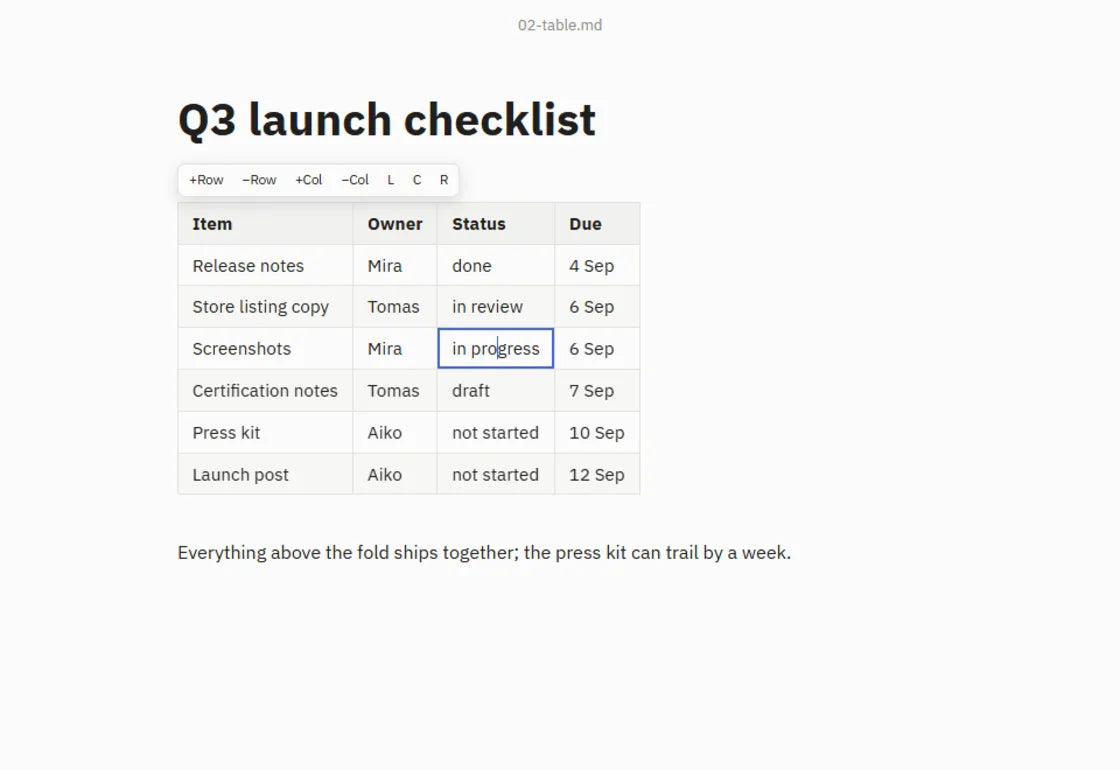
Tables you can edit
A Markdown table shows as a real grid. Click a cell and type, Tab across, Enter for a new row. The pipes tidy themselves.
-
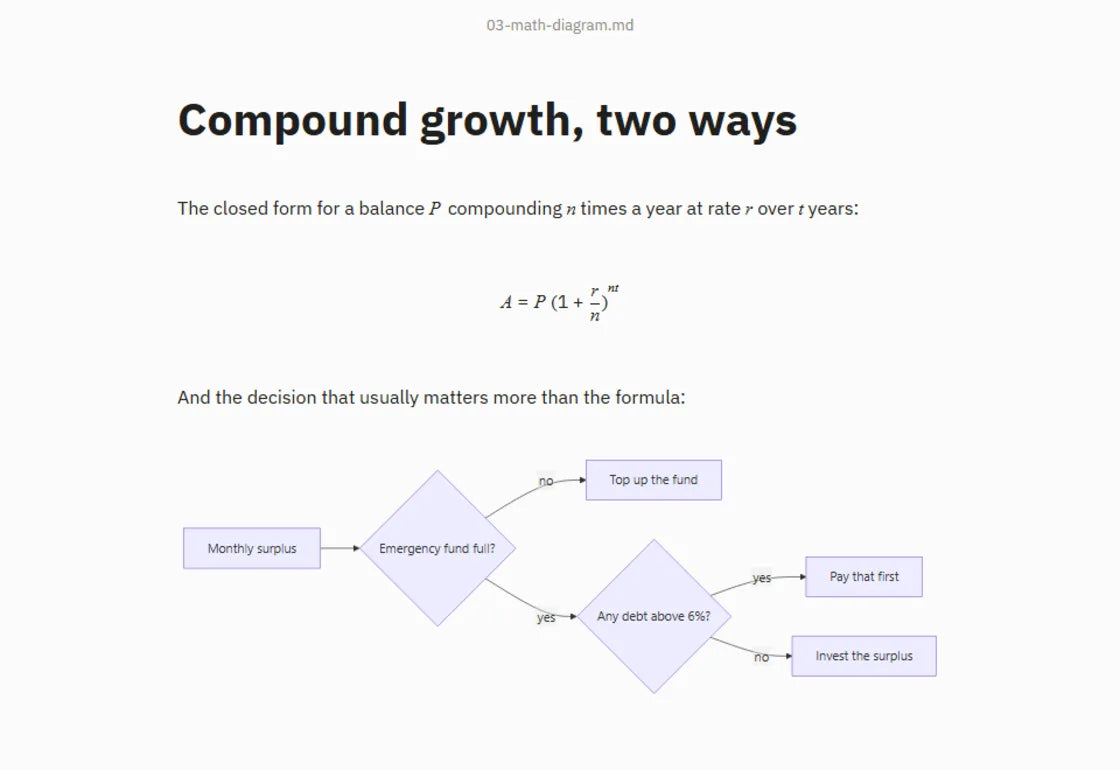
Maths and diagrams
KaTeX maths and Mermaid diagrams draw right in the document, from ordinary fenced blocks.
-
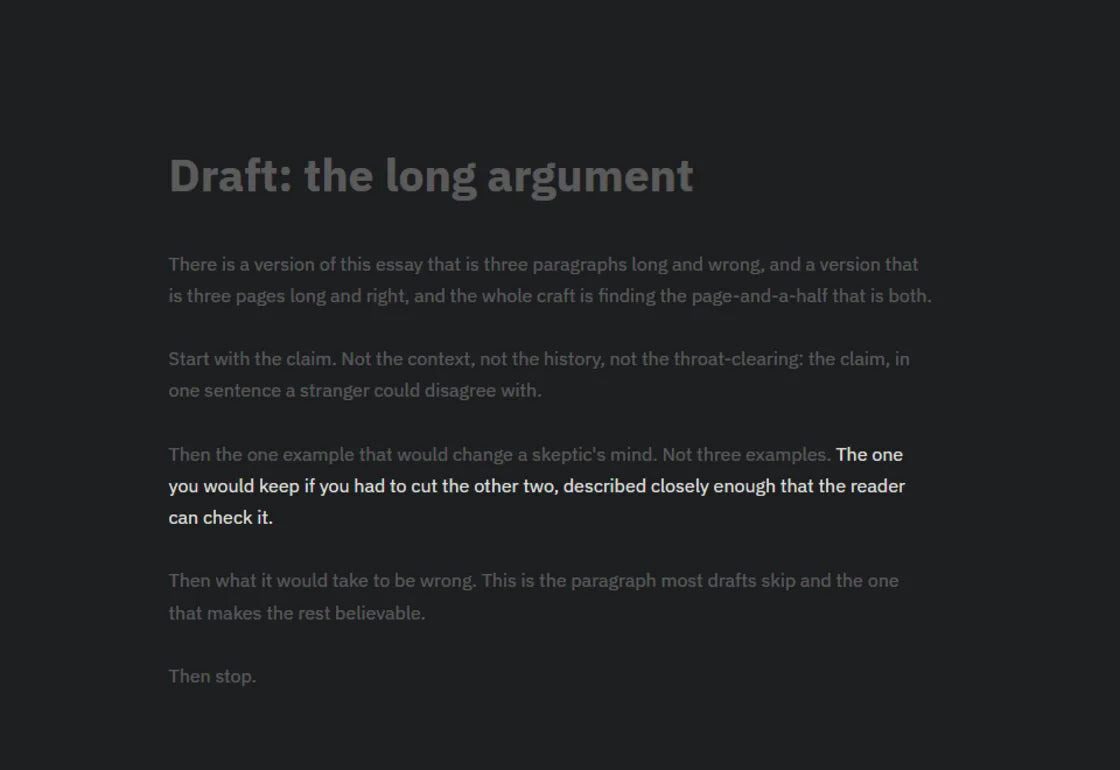
Focus, typewriter and Vim
Focus mode dims everything but the sentence you're in. Typewriter mode keeps your line centred, and real modal Vim is there when you want it.
-
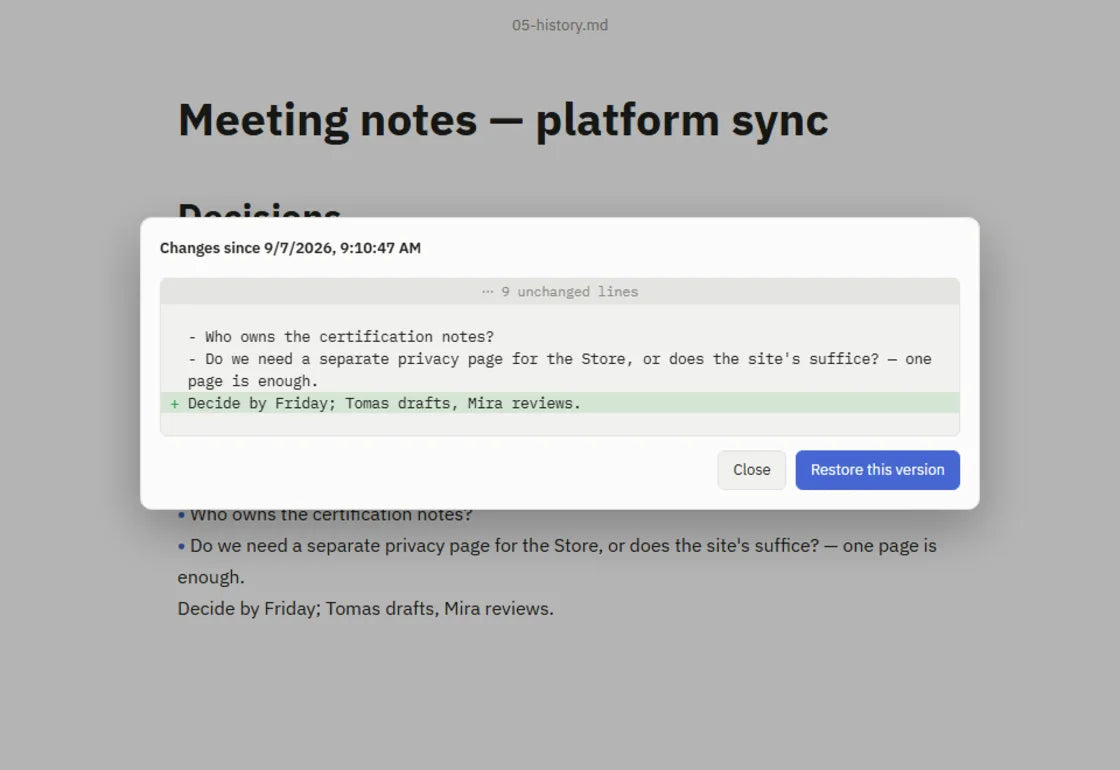
Local version history
Off until you turn it on. Then every save is a snapshot you can compare with now and restore. It never leaves your computer.
Also in the box
Everything else
Writing
- Live preview: marks hide as you move on
- Focus and typewriter modes
- Modal Vim, :w and :wq included
- Command palette and quick open
- Find and replace, spellcheck, smart punctuation
- Light, Sepia and Dark themes, or your own CSS
- Zoom from 50 to 300%
- Select text to count it: "12 of 1,340 words"
Workspace
- Folder sidebar that sorts note2 before note10
- Tabs, or a window per document
- The whole session comes back, even after an update
- Search across the workspace
- Open a handful of files at once
For developers
- Extension for VS Code, Cursor, Windsurf and VSCodium that opens your file at the cursor
- constly --goto=42:9 from the terminal
- YAML and Hugo TOML front matter as a tidy properties panel
- KaTeX maths, Mermaid, footnotes and [toc]
- Cmd or Ctrl-click opens links
Privacy
- No account and no telemetry
- Web pictures load only when you click
- A document can't make Constly contact a network share
- PDF export shrugs off pictures built to hurt it
- Windows files signed by Run The Wall
- Mac app signed and notarised
Why we build
Small tools, built to last
Writing should feel like a document without your files ever depending on the app. That's the whole job.
Your notes are ordinary files in a folder you pick. Anything that reads text can open them.
No sign-up, no telemetry. It opens, edits and saves with the wifi off.
Cold start, measured on an Apple M4 Mac.
A Rust core in a native window, not Electron, so the installer stays small.
Get Constly
Mac, Windows and Linux
A native build for each. Downloads come straight from constly.com.
-
macOS
macOS 11 or later, Apple Silicon or Intel
- Signed and notarised by Apple
- Keeps itself up to date
- Or Homebrew: brew install --cask runthewall/tap/constly
-
Windows
Windows 10 (1803+) and 11, 64-bit
- Installer signed by RUN THE WALL PTY LTD
- Also on the Microsoft Store
-
Linux
Ubuntu 22.04+ or similar, with WebKitGTK 4.1
- .deb for Debian and Ubuntu
- .rpm for Fedora and RHEL
- .tar.gz for any distro
Every feature, no expiry, no watermark, no account. After two weeks a friendly reminder pops up about once a week.
A one-time licence for up to three devices retires the reminder. No subscription, free updates within the version, 30-day refund.
In US dollars, plus applicable tax. Checkout is on constly.com. Writing in VS Code, Cursor or Windsurf? The free Open Markdown in Constly extension opens your file in Constly at your cursor.
Questions
Straight answers
Is it really free?
Yes. Every feature works with no expiry and no watermark. After two weeks a reminder asks you to buy, about once a week. A one-time US$19.99 licence for up to three devices makes it go away. Nothing checks and nothing stops you.
Will it change my files?
No. Edit one paragraph and only that paragraph changes on disk. Your line endings, BOM and trailing spaces stay as they were.
Does it need the internet?
No. There's no account and no server to reach to open, edit or save a file. It checks for updates, which you can switch off in Settings. constly.com/download lists exactly what it sends.
Which computers does it run on?
Macs on macOS 11 or later (Apple Silicon or Intel), 64-bit Windows 10 (1803+) and 11, and Linux with WebKitGTK 4.1 (Ubuntu 22.04+ or similar).
 01Train
 03Build